10 Essential Tips for Choosing the Best Mini Personal Computer?
Choosing a Mini Personal Computer can be challenging. With many options available, it's easy to feel overwhelmed. You want a device that fits your needs perfectly. A Mini Personal Computer should be compact, efficient, and powerful enough for your tasks.
When assessing different models, consider processing power and memory. Look for the latest technology in a small form factor. Many users overlook connectivity options. Ensuring adequate ports is crucial for accessories and peripherals. Design and build quality also matter; a durable Mini Personal Computer will last longer.
Reflecting on your specific needs can guide your decision. Do you need it for gaming, work, or casual use? Each purpose has unique requirements. Mistakes can happen if you rush this process. Take your time, weigh your options, and find the best Mini Personal Computer for you.
Factors to Consider When Choosing a Mini Personal Computer
When choosing a mini personal computer, several factors come into play. Size and portability are crucial. Many people want a compact device that fits in small spaces. A lightweight model is ideal for travel or remote work. However, some find small screens difficult to work on for extended periods. You may need an external monitor for comfort.
Performance specifications are also vital. Look for reliable processors and adequate RAM. Balancing power and energy efficiency is a challenging task. It’s tempting to go for the highest specs, but consider your actual needs. Over-specifying can lead to wasted resources and money. Sometimes, a mid-range option suffices for everyday tasks.
Storage options vary greatly among mini PCs. Solid-state drives (SSDs) offer speed but can be expensive. Hard disk drives (HDDs) provide more space but slower performance. There’s a tricky balance to strike between cost and functionality. Evaluate your data storage needs carefully. Additionally, connectivity options can hinder or enhance usability. Check for sufficient ports for peripherals. Sometimes, lacking a crucial port can be frustrating.
10 Essential Tips for Choosing the Best Mini Personal Computer
| Factor |
Description |
Importance Level |
| Size |
Consider the physical dimensions and weight for portability. |
High |
| Performance |
Look for CPU speed and RAM capacity to ensure smooth operation. |
High |
| Storage |
SSD vs HDD choice and storage capacity appropriate for your needs. |
Medium |
| Connectivity |
Available ports (USB, HDMI, Ethernet, etc.) to connect devices. |
High |
| Graphics |
Integrated vs dedicated graphics depending on usage (gaming, design). |
Medium |
| Operating System |
Select an OS that meets your software requirements (Windows, Linux, etc.). |
High |
| Upgradeability |
Check if components like RAM and storage are upgradable. |
Medium |
| Cooling System |
Ensure sufficient cooling to maintain performance and longevity. |
Medium |
| Power Consumption |
Consider energy efficiency for cost savings and environmental impact. |
Low |
| Price |
Stay within budget while ensuring necessary features and performance. |
High |
Understanding the Processor Types and Their Performance Metrics
When choosing a mini personal computer, the processor type is crucial. Different processors offer varying performance metrics. Understanding these metrics can guide your decision. For instance, look at clock speeds represented in GHz. Higher speeds generally mean better performance. However, this isn’t the only factor.
Consider the number of cores. A dual-core or quad-core processor can enhance multitasking capabilities. If you plan to run demanding applications, opt for more cores. Also, check for hyper-threading technology. This allows each core to handle several tasks simultaneously, improving efficiency.
Tip: Assess your primary use for the mini PC. If you need it for gaming, prioritize higher graphics performance. For basic tasks like browsing or word processing, a simpler processor suffices. Avoid spending excessively on features you may not need. Balance your budget and performance requirements wisely. Keep in mind that future updates may become necessary. Always reflect on how your needs may evolve and choose accordingly.
Performance Metrics of Mini Personal Computers
RAM and Storage Options: Balancing Speed and Capacity in Mini PCs
When selecting a mini personal computer, RAM and storage are crucial factors. The performance of applications hinges on these components. Reports indicate that a minimum of 8GB RAM is advisable for smooth multitasking. With 16GB, users can handle more demanding applications, especially for gaming and graphic design. Yet, many still opt for 4GB due to cost constraints, which may lead to frustration with slowdowns.
Storage options also matter. SSDs (Solid State Drives) outperform traditional HDDs significantly. A study found that SSDs can enhance boot time by 200-500%. Their read and write speeds transform daily tasks. However, SSDs are typically more expensive per gigabyte. This trade-off forces users to decide between speed and storage capacity. A 256GB SSD often becomes a bottleneck, limiting large file storage or program installations.
It’s essential to balance these choices. Users should assess their needs: casual web browsing requires less RAM and storage than heavy gaming or content creation. Many buyers overlook future needs. Most people may find themselves needing more power as software evolves. This oversight leads to regrets later. Therefore, careful consideration of RAM and storage options can prevent performance disappointments down the line.
The Importance of Graphics Capability for Mini Computer Use Cases
When choosing a mini personal computer, graphics capability is crucial. It defines how well the computer can handle visual tasks. Many users focus on size and price, overlooking graphics performance. A computer with weak graphics might struggle with gaming or design software, leading to frustration.
Consider your intended use. If gaming is on your list, a robust graphics card is necessary. For graphic design, high-quality visuals are a must. An underpowered system will fall short in these scenarios. Think about whether you might want to work with 3D models or video editing. Opting for the cheapest option could result in regret later.
Not every mini PC suits every user. Some may not need high graphics power for basic tasks while others might require more from their machines. Evaluate potential use cases. It’s easy to make mistakes when rushing into a purchase. Take time to research each component, paying special attention to the graphics specifications. A hasty choice can lead to unfulfilled expectations.
Comparing Energy Efficiency and Portability in Mini PC Designs
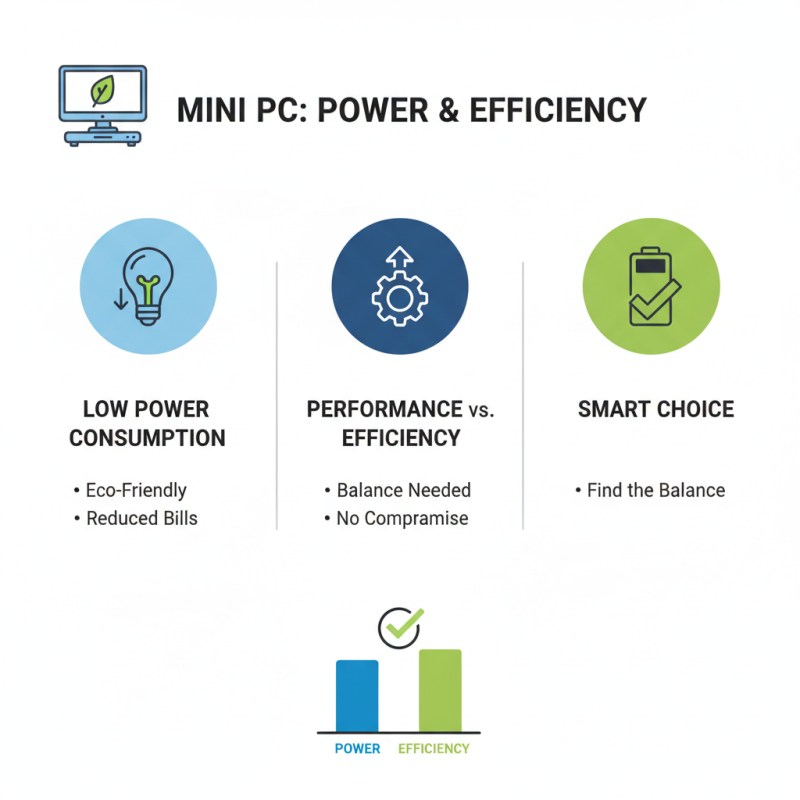
When choosing a mini personal computer, energy efficiency is a crucial factor. Many designs prioritize low power consumption, which is beneficial for both the environment and your electricity bill. However, not all mini PCs deliver on this promise. Some may seem energy-efficient but sacrifice processing power. It's vital to find a balance where performance meets efficiency.
Portability is another important consideration. Mini PCs are designed to be compact, allowing for easy transport. But this compactness can lead to compromises in cooling solutions. Overheating may become a concern in tightly packed designs. Users should be aware of the potential trade-offs. A device that is lightweight could struggle with performance under heavy loads, making it less practical for demanding tasks.
Ultimately, evaluating both energy efficiency and portability helps make a smart choice when selecting a mini PC. Carefully assessing your unique needs can lead to finding a model that truly fits your lifestyle. Don't just glance at the specs; consider how it will serve you in real-world situations.

 14 Inch Office Notebook
 Dual Screen Laptop
 Fingerprint Business Notebook
 Big Screen Laptop
 HD Gaming Laptop
 14.1 Inch Student laptops
 16.1 Inch Office Laptops
 Home Mini Host
 Industrial Micro PC
 Fanless Industrial Mini PC
 Commercial Mini PC
 RTX3050TI Game Mini PC
 Micro Mini PC
 Fanless Mini PC
 High-end Mini PC
 More
More Micro ATX Computer Motherboard