How to Choose the Best Micro PC for Your Needs?
Choosing the right Micro PC can be a daunting task. With so many options available, making the best choice for your needs requires careful consideration. Renowned industry expert Dr. Linda Chen, a leading figure at Tech Innovations, once stated, “A Micro PC should blend performance with portability to truly serve its purpose.” This insight reflects the evolving demands of users today.
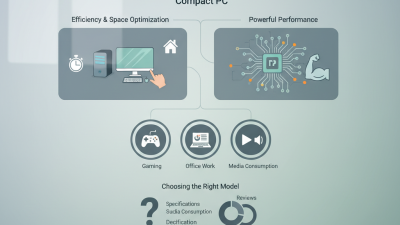
Micro PCs have gained popularity thanks to their compact size and efficiency. However, not all Micro PCs are created equal. Factors like processing power, storage capacity, and connectivity options are vital in determining which model suits your requirements. Identifying the right specifications requires an understanding of your primary use cases, be it gaming, business, or casual browsing.
When venturing into the Micro PC market, it's crucial to evaluate both brand reputation and customer feedback. Some brands promise more than they deliver, while others consistently meet user expectations. As you navigate your options, consider what works best for your unique situation to avoid regrets later on.
Understanding Your Computing Needs and Use Cases
When selecting a micro PC, understanding your computing needs is essential. Different users have varying requirements. Some may need an all-in-one solution for basic tasks like browsing and document editing. Others might require more power for gaming or graphic design. Assess what you'll primarily use the device for. Will it support multimedia streaming, programming, or casual gaming? Knowing your primary use case can guide your choice effectively.
Consider the physical space where the micro PC will reside. A smaller footprint allows for computer use in limited spaces. However, avoid sacrifices in performance. Sometimes, a compact form factor means lower specifications. Research multipurpose models that balance size and capability. Maybe a fan-less design suits a quiet workspace, but does it meet your computational needs?
Reflect on future needs as well. Your computing demands might grow over time, so it helps to evaluate scalability. Can you upgrade memory or storage later? If you're investing in a micro PC, choose a model that allows for adjustments. Ultimately, being clear about your needs will lead to better choices. It's not just about today; think of tomorrow.
Key Specifications to Consider When Selecting a Micro PC
When selecting a micro PC, key specifications can greatly impact your experience. Start by evaluating the processor. A strong CPU can enhance performance, especially for demanding tasks. Consider the RAM capacity too; more memory allows for smoother multitasking. For everyday use, 8GB is often adequate, but 16GB or more is ideal for heavier applications.
Storage options also play a vital role. SSDs offer speed and reliability, while HDDs provide larger capacity at a lower cost. Think about your own needs. If you deal with large files or applications, SSDs make a difference in speed. For typical users, a combination of both might serve well.
Tips: Always check connectivity options. USB ports, HDMI, and Wi-Fi capabilities are essential. Ensure your micro PC can connect to all your devices. For those who travel often, portability is key. Look for a lightweight model without sacrificing performance. Keep in mind that power supply can be a concern. Research battery life and heat management for long-term usability.
Micro PC Specifications Comparison
This chart displays the key specifications to consider when selecting a Micro PC. It includes important factors such as RAM, storage capacity, price, weight, and power consumption, helping users to make informed choices based on their needs.
Comparing Performance: Processors, RAM, and Storage Options
When selecting a micro PC, processor performance is crucial. Look for multi-core options. These enhance multitasking capabilities. A quad-core processor may suit everyday tasks. For gaming or graphic design, consider stronger processors. Be aware that over time, power-efficient options may lag behind in performance.
RAM also impacts performance significantly. More RAM means better multitasking. Aim for at least 8GB for smooth operation. Heavy users might need 16GB or more. However, more RAM can be wasted on simple tasks. Reflect on your usage patterns before opting for upgrades.
Storage types matter. Solid-State Drives (SSDs) are faster than Hard Disk Drives (HDDs). An SSD boosts loading times dramatically. However, they are pricier. Balancing speed and cost can be tricky. Consider a dual-drive setup: an SSD for your OS and essential programs, along with an HDD for storage.
Tips: Prioritize base requirements over high specifications. Set a budget, then find the best fit. Regularly reassess your needs as technology evolves. Don't overlook future-proofing; it might save you costs down the line.
Evaluating Connectivity Options and Peripheral Support
When selecting a micro PC, evaluating connectivity options is crucial. The right ports ensure your device can connect to various peripherals, enhancing functionality. According to a recent industry analysis, over 75% of users prioritize USB-C and HDMI ports in their micro PCs. These connections offer versatility for modern devices, from monitors to external drives.
Tips: Check for multiple USB ports. This allows simultaneous connection of keyboards, mice, and other devices.
Wireless connectivity options also matter. A device with Wi-Fi 6 support can provide faster speeds and improved reliability. It is noteworthy that 80% of professionals report better performance with devices featuring the latest wireless technology. However, some micro PCs may lack robust Bluetooth support. This might restrict your ability to connect wireless peripherals, which can be frustrating.
Tips: Ensure Bluetooth capability if you rely on wireless accessories. Look for devices that specifically mention compatibility with various devices.
Consider your workflow and the peripherals you already own. A micro PC should complement your setup, not hinder it. This requires thoughtful assessment of connectivity requirements. Remember, a well-connected micro PC can enhance productivity significantly.
How to Choose the Best Micro PC for Your Needs? - Evaluating Connectivity Options and Peripheral Support
| Micro PC Model |
Connectivity Options |
USB Ports |
HDMI Output |
Wi-Fi Support |
Bluetooth Support |
| Model A |
2 x USB 3.0, 1 x USB-C, Ethernet |
4 |
Yes |
Wi-Fi 6 |
Yes |
| Model B |
4 x USB 3.0, HDMI, DisplayPort |
6 |
Yes |
Wi-Fi 5 |
Yes |
| Model C |
2 x USB 2.0, 2 x USB 3.0, Ethernet |
4 |
Yes |
No |
No |
| Model D |
1 x USB-C, 3 x USB 3.0, HDMI |
5 |
Yes |
Wi-Fi 6 |
Yes |
Budget Considerations and Value for Money in Micro PCs
When selecting a micro PC, budget plays a pivotal role. You need to evaluate your requirements relative to your finances. A low-cost option might meet basic needs but could lack performance. Conversely, spending more guarantees better specs but may not justify the extra cost. Finding the sweet spot is critical.
Tips: Look out for essential functionalities you need. If you’re focused on basic tasks, a modest processor will suffice. However, if you plan on multitasking, invest in a model with a more powerful CPU and RAM. Research is vital. Compare prices and reviews. Don’t rush; sometimes waiting for discounts can yield significant savings.
Consider refurbished models as well. These can deliver high value without the hefty price tag of newer units. Just ensure you buy from reputable sellers. Suggested specifications often differ. Many users might overlook details, leading to future regrets. Reflect on your usage. A bit of self-reflection can prevent overspending and dissatisfaction.

 14 Inch Office Notebook
 Dual Screen Laptop
 Fingerprint Business Notebook
 Big Screen Laptop
 HD Gaming Laptop
 14.1 Inch Student laptops
 16.1 Inch Office Laptops
 Home Mini Host
 Industrial Micro PC
 Fanless Industrial Mini PC
 Commercial Mini PC
 RTX3050TI Game Mini PC
 Micro Mini PC
 Fanless Mini PC
 High-end Mini PC
 More
More Micro ATX Computer Motherboard